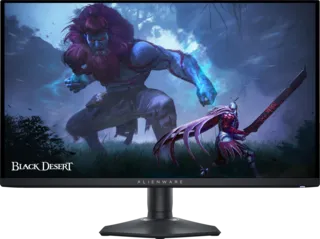
Our Top Pick: Dell Alienware AW3425DW
The Dell Alienware AW3425DW is the best 34-inch monitor we've tested. It's a premium ultrawide with a QD-OLED panel.
Why It's Great
- 34-inch ultrawide (21:9 aspect ratio)
- QD-OLED panel technology
- Excellent color volume and HDR performance
- Fast response times for gaming
- Curved design for immersion
Specifications
- Resolution: 3440 x 1440 (WQHD)
- Refresh Rate: 175Hz
- Panel: QD-OLED
- Response Time: Near-instant (0.03ms)
- Contrast: Infinite (OLED)
Why Choose 34-49 Inch Monitors?
Benefits of Large/Super Ultrawide Monitors
Immersive Gaming: Large and ultrawide monitors wrap around your field of view, providing a more immersive gaming experience. Games that support ultrawide resolutions offer expanded peripheral vision.
Productivity Powerhouse: These monitors offer screen real estate equivalent to multiple smaller monitors without bezels breaking up the display.
Multitasking: Perfect for content creators, streamers, and professionals who need multiple windows open simultaneously.
Size Categories
34-Inch Ultrawide (21:9)
- Resolution: 3440x1440 typical
- Use Case: Gaming, productivity, content creation
- Benefit: Wider field of view without excessive height
- Best For: Most users wanting ultrawide benefits
38-Inch Ultrawide (21:9)
- Resolution: 3840x1600 typical
- Use Case: Premium productivity and gaming
- Benefit: More vertical space than 34-inch
- Best For: Those wanting maximum ultrawide real estate
49-Inch Super Ultrawide (32:9)
- Resolution: 5120x1440 typical
- Use Case: Productivity, sim racing, specific games
- Benefit: Equivalent to two 27-inch monitors side-by-side
- Best For: Power users, flight/racing sims
Considerations for Large Monitors
Desk Space
- 34-inch: Requires standard desk space
- 38-inch: Needs larger desk
- 49-inch: Requires dedicated large desk setup
GPU Requirements
Higher resolutions demand more GPU power:
- 3440x1440: RTX 3060 Ti / RX 6700 XT minimum
- 3840x1600: RTX 3070 / RX 6800 minimum
- 5120x1440: RTX 4070 / RX 7800 XT minimum
Game Compatibility
Not all games support ultrawide resolutions:
- Most modern AAA games support 21:9
- 32:9 support is less common
- Older games may have black bars
Panel Technology
Large monitors come in various panel types:
- IPS: Good colors, moderate contrast
- VA: Better contrast, can have smearing
- OLED: Best contrast and colors, premium price
- Mini LED: Good middle ground for HDR
Use Cases for Different Sizes
34-Inch: The Sweet Spot
- Gaming with expanded FOV
- Productivity with side-by-side windows
- Content creation timeline editing
- Fits most desks comfortably
38-Inch: Maximum Ultrawide
- Professional video editing
- Heavy multitasking workflows
- Premium gaming experience
- Requires dedicated desk space
49-Inch: Productivity King
- Stock trading with multiple charts
- Software development with many IDEs
- Flight/racing simulation
- Replacing dual-monitor setups
Features to Look For
Essential
- Curvature: 1500R-1800R recommended for immersion
- Resolution: Match size to appropriate pixel density
- Refresh Rate: 144Hz+ for gaming
- Adaptive Sync: FreeSync Premium or G-Sync Compatible
Nice to Have
- USB-C: Single cable for laptops
- KVM Switch: Control multiple PCs
- HDR: DisplayHDR 600+ for good HDR
- PIP/PBP: Picture-in-picture modes
Monitor Critic Testing Methodology
Monitor Critic evaluates large monitors with:
- Ergonomic assessment for desk fit
- Color accuracy across entire wide screen
- Uniformity testing (important for large panels)
- Gaming performance at native resolution
- HDR testing with local dimming evaluation
- Response time and input lag measurements
Buying Recommendations
For Gamers
- 34-inch: Most practical, good game support
- Look for 144Hz+ and adaptive sync
- Curved helps with immersion
- QD-OLED or Fast IPS panels preferred
For Professionals
- 38-inch: Maximum screen real estate
- 49-inch if replacing dual monitors
- Color accuracy important (IPS or OLED)
- USB-C connectivity for modern workflows
For Mixed Use
- 34-inch: Best balance of gaming and productivity
- Mini LED or OLED for versatility
- Multiple inputs for device switching
Common Pitfalls
- Buying too big for your desk - Measure first!
- Underestimating GPU needs - Large resolutions are demanding
- Ignoring game compatibility - Not all games support ultrawide
- Forgetting about viewing distance - Larger monitors need more distance
- Overlooking panel uniformity - More important on large screens
The Bottom Line
34-49 inch monitors offer an immersive experience that standard monitors can't match. The 34-inch size hits the sweet spot for most users, while 49-inch super-ultrawides cater to specific power-user needs. Consider your desk space, GPU power, and use case carefully before committing to these large displays.