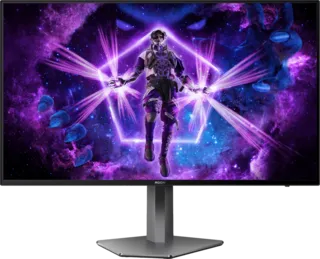
Our Top Pick: AOC Q27G3XMN
The best gaming monitor under $300 is the AOC Q27G3XMN. It's a unique monitor with more features and better performance than similarly priced displays.
Key Features
- 27-inch QHD (2560x1440) resolution
- Mini LED backlighting with 576 local dimming zones
- 180Hz refresh rate
- Fast IPS panel
- Excellent contrast for the price point
This monitor stands out in the sub-$300 category by offering Mini LED technology, which is typically found in much more expensive displays. The local dimming zones provide better contrast and HDR performance than standard edge-lit monitors.
Runner-Up: Gigabyte MO27Q28G
Another excellent option in this price range is the Gigabyte MO27Q28G. It offers:
- 27-inch QHD resolution
- 180Hz refresh rate
- KVM switch built-in
- USB-C connectivity
- Good color accuracy out of the box
Best Budget 1080p: AOC Q27G40XMN
For those prioritizing high refresh rates over resolution:
- 27-inch 1080p display
- 260Hz refresh rate
- Fast IPS panel
- Excellent motion clarity
- Great for competitive gaming on a budget
Alternative: LG 27GX700A-B
LG's offering in this category features:
- 27-inch QHD resolution
- 180Hz refresh rate
- Nano IPS panel
- Good factory calibration
- Reliable build quality
What to Expect Under $300
Resolution
- 1080p and 1440p options available
- 1440p offers better pixel density and clarity
- 1080p allows for higher refresh rates
Refresh Rate
- 144Hz to 260Hz range common
- Higher is better for competitive gaming
- 180Hz is the sweet spot for most users
Panel Type
- Fast IPS dominates this category
- Good color accuracy and viewing angles
- Response times typically 1-4ms GtG
Features to Look For
- Adaptive Sync: FreeSync/G-Sync Compatible essential
- Connectivity: DisplayPort and HDMI
- Ergonomics: Height adjustability if possible
- VESA Mount: For flexible positioning
Limitations at This Price
- No OLED panels
- Limited HDR performance (DisplayHDR 400 typical)
- Basic build quality on some models
- Fewer premium features (no KVM on most)
Buying Recommendations
For Competitive Gaming
- Prioritize refresh rate (180Hz+)
- Look for fast IPS panels
- Input lag under 10ms
- 1080p acceptable for maximum FPS
For Mixed Use
- 1440p resolution recommended
- 144Hz-180Hz sufficient
- Good color accuracy for content consumption
- Multiple connectivity options
For Console Gaming
- Ensure HDMI 2.0 support for 120Hz
- 1440p or 4K resolution
- HDR support if possible
- Low input lag essential
Monitor Critic Testing Methodology
Monitor Critic tests budget monitors with the same rigor as premium displays:
- Color accuracy measurements
- Response time testing
- Input lag measurements
- Contrast and brightness testing
- Build quality assessment
- Feature verification
All recommendations are based on actual measured performance, not manufacturer specifications.