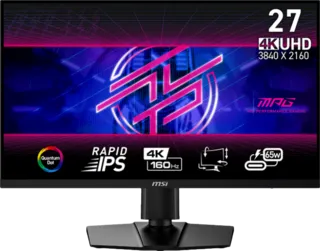
Overview
When comparing VA vs IPS monitors, you should know that IPS monitors have wider viewing angles, while VA monitors have a better contrast ratio.
Both panel types have their strengths and weaknesses, making them suitable for different use cases and preferences.
IPS (In-Plane Switching) Panels
Key Characteristics
Advantages:
- Wide viewing angles - Colors stay accurate even at extreme angles
- Accurate color reproduction - Great for color-critical work
- Fast response times - Modern Fast IPS panels achieve 1-2ms
- No color shift - Consistent across the screen
- Good for multi-monitor setups - Edge viewing remains accurate
Disadvantages:
- Lower contrast ratio - Typically 1000:1
- IPS glow - Visible glow in dark scenes at off-angles
- More expensive - Than TN panels, comparable to VA
- Backlight bleed - Can occur in dark scenes
Best Use Cases
- Content creation - Photo and video editing
- Office work - Documents, spreadsheets, multitasking
- Multi-monitor setups - Wide viewing angles beneficial
- Casual gaming - Fast enough for most games
- Professional work - Color accuracy important
VA (Vertical Alignment) Panels
Key Characteristics
Advantages:
- Excellent contrast ratio - Typically 3000:1 to 6000:1
- Deep blacks - Much better than IPS
- Good color reproduction - Better than TN, close to IPS
- No IPS glow - Better dark room performance
- Often curved - Many VA gaming monitors feature curves
Disadvantages:
- Narrower viewing angles - Colors shift at angles
- Slower response times - 4-8ms typical, can have dark smearing
- Color shift - Especially at vertical angles
- Dark smearing - Black-to-gray transitions can be slow
Best Use Cases
- Dark room gaming - High contrast benefits horror games, movies
- Cinematic experiences - Better for story-driven games
- Single-player gaming - Visual quality over competitive speed
- Movie watching - Deep blacks enhance video content
- General use - Good all-around performance
Direct Comparison
| Feature | IPS | VA |
|---|---|---|
| Viewing Angles | Excellent (178°) | Good (160°+) |
| Contrast Ratio | ~1000:1 | 3000:1-6000:1 |
| Black Levels | Grayish | Deep black |
| Response Time | 1-4ms (Fast IPS) | 4-8ms |
| Color Accuracy | Excellent | Good |
| Color Gamut | Wide coverage | Good coverage |
| Dark Room Use | IPS glow issues | Excellent |
| Motion Handling | Better | Can have smearing |
| Price | Mid-range | Mid-range |
Gaming Performance Comparison
Competitive Gaming (FPS, MOBA, Battle Royale)
Winner: IPS
Why:
- Faster response times available
- Better motion handling
- No dark smearing
- More consistent colors across screen
Recommended:
- Fast IPS panels with 1-2ms response time
- 144Hz+ refresh rate
- G-Sync/FreeSync support
Single-Player/Cinematic Gaming (RPG, Adventure, Horror)
Winner: VA
Why:
- Better contrast enhances atmosphere
- Deep blacks improve dark scenes
- More immersive experience
- Often available in curved format
Recommended:
- VA panels with good local dimming
- Curved options for immersion
- High contrast for atmospheric games
Mixed Use (Gaming + Work)
Winner: IPS
Why:
- Better for productivity work
- Wide viewing angles for sharing
- Fast enough for gaming
- Accurate colors for content
Response Time and Motion Handling
IPS Response Times
- Standard IPS: 4-5ms
- Fast IPS: 1-2ms
- Very Fast IPS: Under 1ms (rare)
Motion Handling: Generally excellent with minimal ghosting
VA Response Times
- Typical VA: 4-8ms
- Fast VA: 4ms
- Dark transitions: Can be 20ms+ (smearing)
Motion Handling: Good overall, but dark smearing can be noticeable in some games
Contrast Ratio Deep Dive
Why Contrast Matters
IPS (~1000:1):
- Black appears dark gray
- Backlight always on
- IPS glow reduces perceived contrast
- Good for bright rooms
VA (3000:1-6000:1):
- Black appears truly black
- Better light blocking
- No glow issues
- Excellent for dark rooms
Real-World Impact
In Bright Rooms:
- Differences less noticeable
- IPS performs well
- Ambient light reduces contrast benefit
In Dark Rooms:
- VA advantage significant
- Better for horror games/movies
- Less eye strain
Viewing Angle Performance
IPS Viewing Angles
- Horizontal: Minimal color shift to 178°
- Vertical: Minimal color shift to 178°
- Consistency: Excellent across entire screen
VA Viewing Angles
- Horizontal: Good performance to ~160°
- Vertical: Color shift more noticeable
- Gamma shift: Brightness changes at angles
Impact on Use:
- IPS better for multi-monitor
- VA fine for single user centered viewing
- Head-on viewing minimizes differences
Price Comparison
Similar Price Points
IPS and VA monitors are generally comparably priced in most segments:
Budget ($200-300):
- Both available
- VA may have better contrast
- IPS may have better color accuracy
Mid-Range ($300-600):
- Feature-rich options available
- Fast IPS variants compete with VA
- Quality improvements in both
High-End ($600+):
- Both panel types available
- IPS often preferred for premium gaming
- VA less common at very high end
Monitor Critic Recommendations
Best IPS Gaming Monitors
- ASUS ROG Strix XG27ACS - Budget-friendly Fast IPS
- LG 27GX700A-B - All-around excellent
- AOC Q27G3XMN - Mini-LED with IPS benefits
Best VA Gaming Monitors
- Samsung Odyssey G5 - Curved VA option
- Many ultrawide options use VA panels
Latest OLED Alternatives
For those wanting best of both:
- QD-OLED: Best contrast, fast response
- WOLED: Excellent blacks, good speed
- Price: Premium compared to LCD
Final Verdict
Choose IPS If:
- You do color-critical work
- You use multiple monitors
- You play competitive games
- You work in a bright room
- You want wide viewing angles
Choose VA If:
- You game in a dark room
- You prioritize contrast
- You play cinematic single-player games
- You want deep blacks
- You don't play fast competitive games
Neither is "Best"
Both panel types excel in different areas. Your choice should depend on:
- Primary use case
- Room lighting conditions
- Types of games you play
- Budget considerations
- Personal preference for image characteristics