What Is a Dual Monitor Setup?
A dual monitor setup uses two separate displays side by side to extend your screen real estate. This has been the standard for power users, content creators, and professionals who need more space than a single monitor can provide.
What Are Ultrawide Monitors?
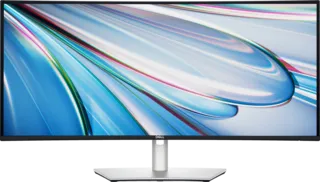
Ultrawide monitors feature a 21:9 aspect ratio instead of the standard 16:9, offering significantly more horizontal screen space on a single display. Common ultrawide resolutions include 2560×1080, 3440×1440, and 3840×1600.
Extended Screen Real Estate on One Screen
The Bezel Gap Problem
While dual monitors are one way of extending your screen space, one of the major downfalls has always been the gap between the two monitors, also known as the bezel gap. Even with today's ultra-thin bezels, a visible gap remains between two separate displays.
One of the biggest improvements when switching to a single ultrawide monitor is the removal of the bezel gap. Nothing interrupts your view across the screen.
This small change makes a noticeable difference. Managing multiple windows or editing content feels smoother and more natural.
Bottom Line: It's difficult to go back to a setup with a bezel gap created by dual monitors after experiencing one seamless ultrawide screen setup.
Cinematic Aspect Ratio
Ultrawide monitors offer a distinct advantage over dual monitor setups when it comes to aspect ratio, particularly for watching movies and playing supported games. They typically feature a 21:9 aspect ratio, which closely mirrors the format used for cinematic content.
Because of this, many cinematic films can be displayed closer to their native ratio, reducing or eliminating letterboxing (the black bars that appear at the top and bottom of the screen). This allows the entire screen to be utilized, enhancing the viewing experience.
Letterboxing occurs on monitors with a 16:9 aspect ratio because the movie has to be scaled down to fit the screen, leaving unused space above and below the image. In contrast, an ultrawide monitor avoids this by matching the native 21:9 ratio.
Bottom Line: If you enjoy watching movies, ultrawide monitors offer the advantage of viewing them in full size without letterboxing.
Consistency on One Screen vs. Two Screens
The Dual Monitor Consistency Challenge
As you probably know, monitors come in a variety of resolutions. In an ideal scenario, a dual monitor setup would feature two identical monitors—the same size and resolution. However, this is often not the case in reality.
While dual monitors with different resolutions can be used, moving content between screens can be frustrating, as you'll often need to adjust the size of what you're dragging. Using monitors of different sizes also presents additional challenges.
Ultrawide Advantages
When it comes to consistency, a single ultrawide monitor offers several advantages over dual monitor setups:
- No color discrepancies: Single panel means uniform color across entire screen
- Consistent brightness: No variation between different monitor backlights
- Uniform display quality: Same specs across entire workspace
- Seamless workflow: Drag content anywhere without adjusting for different displays
For tasks that require visual accuracy or uniformity across the display, an ultrawide monitor ensures a more cohesive experience.
These inconsistencies are less of an issue if you use two identical monitors with matching specs, especially models that support factory calibration or color management tools. When monitors differ, moving content between screens can result in varying visual quality, making it difficult to determine the most accurate display.
Bottom Line: Unless you're using identical monitors, a single ultrawide screen eliminates inconsistencies and provides a more seamless viewing experience.
Window Management
When comparing window management between ultrawide and dual monitor setups, both offer unique advantages:
Dual Monitor Window Management
- Natural separation between screens
- Full-screen apps on one monitor while working on another
- Easy to maximize windows to fill each display
Ultrawide Window Management
Modern operating systems provide powerful tools for managing windows on ultrawide displays:
Windows 11:
- Snap Layouts: Quickly arrange windows in predefined layouts
- Snap Groups: Remember app arrangements
Microsoft PowerToys:
- FancyZones: Create custom window zones
- Precise control over window placement
macOS:
- Built-in window management features
- Split View for side-by-side apps
- Mission Control for overview
Bottom Line: While window management differs slightly between dual and ultrawide setups, tools like Windows Snap Layouts, FancyZones, and macOS's built-in features make managing multiple windows on an ultrawide monitor just as seamless and versatile as on dual monitors.
Convenience
Ultrawide Convenience Factors
Single Cable Setup:
- One power cable
- One video cable (usually)
- Easier cable management
- Cleaner desk appearance
Unified Settings:
- One OSD to configure
- Consistent color settings
- Single brightness control
- No matching required
Space Efficiency:
- Single monitor stand or arm
- Less desk footprint
- Better for compact setups
Dual Monitor Considerations
More Complex Setup:
- Two power cables
- Two video cables minimum
- More cable management
- Potentially two monitor arms/stands
Configuration Requirements:
- Match color profiles
- Align brightness levels
- Position calibration
- Multiple OSD adjustments
Added Benefit: Curved Screen for Immersion and Eye Comfort
Many ultrawide monitors feature curved screens, which offer additional benefits:
Immersion Benefits
- Wraps around field of view
- More engaging gaming experience
- Better for simulators (racing, flight)
- Enhanced movie watching
Eye Comfort Benefits
- More natural viewing angles
- Consistent distance to screen edges
- Reduces eye movement strain
- Better ergonomic positioning
Curve Recommendations
- 1000R: Aggressive curve, maximum immersion
- 1500R: Middle ground, good balance
- 1800R: Subtle curve, versatile use
Gaming Considerations
Ultrawide Gaming
Advantages:
- Wider field of view in supported games
- More immersive experience
- No bezel interrupting the action
- Better for cinematic games
Considerations:
- Not all games support 21:9
- HUD elements may be at screen edges
- Some competitive games restrict FOV
Dual Monitor Gaming
Advantages:
- Game on one screen, guides/stream on other
- Dedicated display for Discord/chat
- Can have different refresh rates
Disadvantages:
- Bezels interrupt dual-screen gaming
- Not practical for spanning games across
Final Thoughts
Choose Ultrawide If:
- You want a seamless, bezel-free experience
- You watch movies or play cinematic games
- You value consistency in color and brightness
- You want cleaner cable management
- You have limited desk space
- You prefer a single unified workspace
Choose Dual Monitors If:
- You already own two matching monitors
- You need different specs on each display (e.g., one for gaming, one for color work)
- You prefer physical separation between tasks
- You want to game on one while monitoring on the other
- You need different orientations (one portrait, one landscape)
- Budget is a primary concern (two smaller monitors may cost less than one ultrawide)
The Bottom Line
Both setups have merit. Ultrawide monitors offer a more cohesive, immersive experience without bezels. Dual monitors provide flexibility and physical task separation. Your choice should depend on your workflow, desk space, budget, and whether you prioritize immersion or separation.
For many users, ultrawide monitors represent the modern solution that eliminates compromises, offering the screen real estate of dual monitors with the elegance of a single display.